CONTEXT
Designed a Twitter spam moderation workbench that increased moderator efficiency by 22% while improving the quality of data used to train machine learning models
My Role
Senior Product Designer
Client
Twitter (via Innodata)
Timeline
2021 — 6 Month Contract
Industry
ML/AI, Data Annotation
Platform
Web
Tools
Figma, Wireframing, User Research
The problem we needed to solve
Knowledge workers were forced to manage complex, annotation and review workflows across fragmented tools. This slowed throughput, increased cognitive load, and raised the risk of errors in high-volume production environments.
As Senior UI/UX Designer on the Twitter Workbench, I…
- •Led end-to-end experience design for an internal annotation and review workbench used by large, distributed teams
- •Partnered closely with product, engineering, and research to translate complex machine learning workflows into usable, scalable interfaces
- •Designed high-throughput workflows that balanced speed, accuracy, and reviewer confidence in production environments
- •Simplified cognitively demanding tasks by restructuring information hierarchy, interaction patterns, and system feedback
- •Iterated rapidly based on qualitative feedback and usage data to improve efficiency, reduce friction, and increase engagement
BACKGROUND
Improving Data Quality for Twitter's Spam Detection AI
Innodata is a global leader in machine learning and AI, specializing in data collection, annotation, and platform development that help train accurate AI models.
The Twitter Spam Violation Workbench is one of several annotation tools Innodata provided to Twitter. It allowed human moderators to review batches of tweets flagged for possible spam, check the user’s account history, and answer a short set of questions to classify the violation.
Their annotations were then returned to Twitter to improve the accuracy of its machine learning models. Moderators were measured by how many tasks they could complete in a session, so speed and consistency were essential to producing high-quality data.
THE PROBLEM
How can the Twitter Spam Violation Workbench be improved to boost moderator SAR scores and produce more consistent, higher-quality annotations
After reviewing feedback from Twitter, the team saw a clear need to improve the volume, consistency, and quality of the data feeding their machine learning models. Through discussions with Twitter, product management, and engineering, we determined that the best path forward was to improve the moderator workbench experience.
KPIs
Measuring Success
The team aligned on a two key metrics to measure success and then moved into execution
Increase SAR scores by 10%
Improve moderator efficiency to process more annotation tasks per session.
Better identify top performers
Provide managers with clearer data to identify moderators with the highest volume, impact and revenue.
PROCESS
Understanding the Moderator Experience
Diving into the Requirements
As the sole designer on the project I needed to get a clear picture of the workbench rules and how moderators flowed through the Spam Violation annotation process. First, I parsed through multiple documents to condense the workbench ruleset into a concise list of requirements.
Analyzing Real User Behavior
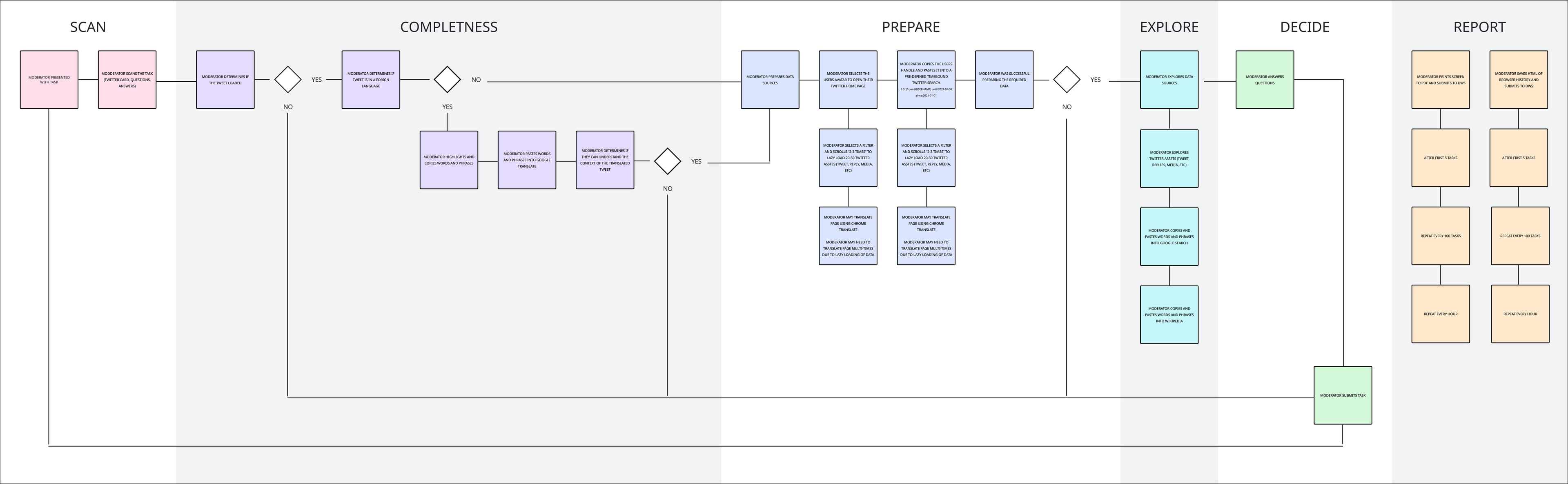
The Twitter team shared dozens of screen-capture videos showing moderators working in real time. These recordings became an invaluable source of insight for the project. The videos revealed several pain points that slowed moderators down. They relied on multiple browser tabs to review tweets, check user accounts, search for keywords, and translate text. Much of their time was spent copying and pasting information between tabs.
This work operated under tight operational constraints. Teams processed large volumes of data daily, accuracy requirements were high, and mistakes carried downstream cost. Any design change had to support speed without sacrificing precision or reviewer confidence.
We brought these findings back to the Twitter team to confirm their accuracy and aligned on the opportunity to address them as a way to improve SAR scores.
Mapping the Moderator Experience
To understand where friction and cognitive load were accumulating, I mapped the end-to-end moderator experience across annotation, review, and decision points. The map revealed breakdowns in flow, loss of context, and key moments where the system needed to better support speed, accuracy, and confident human judgment.
Collaborative Ideation
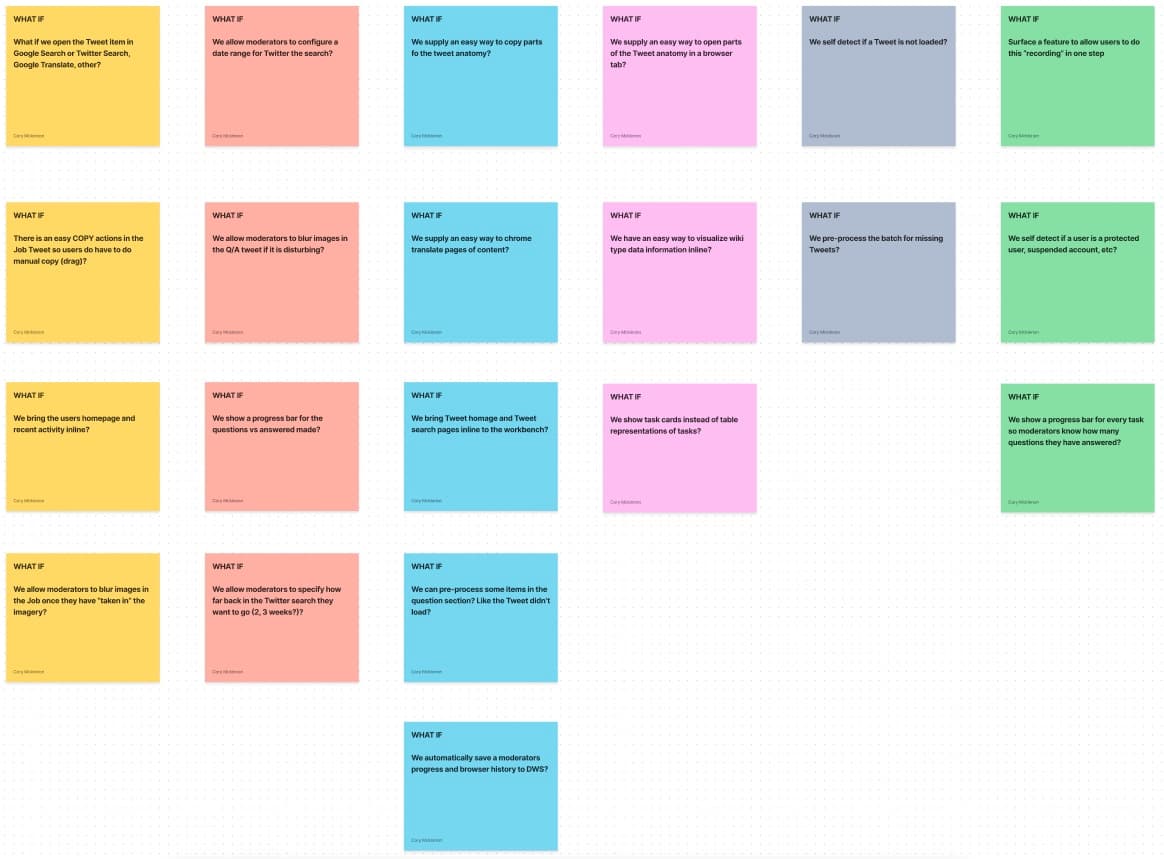
Including the Twitter team in every step of the design process was very important. We brought together key stakeholders and moderators for a "What If" exercise allowing us to go wide with our thinking.
Design and Iteration
Based on what we learned from research and ideation, it was clear that moderators needed all of their key data points brought directly into the app. Switching between multiple browser tabs was slowing them down. They also needed simple tools to translate and copy text. I created a series of mockups exploring different layouts and interactions, then met with the team again to validate the direction.

SOLUTION
A Streamlined Annotation Experience
The system was designed to augment human judgment by providing recommendations and signals, while reviewers retained full control to ensure accuracy and accountability in production workflows.
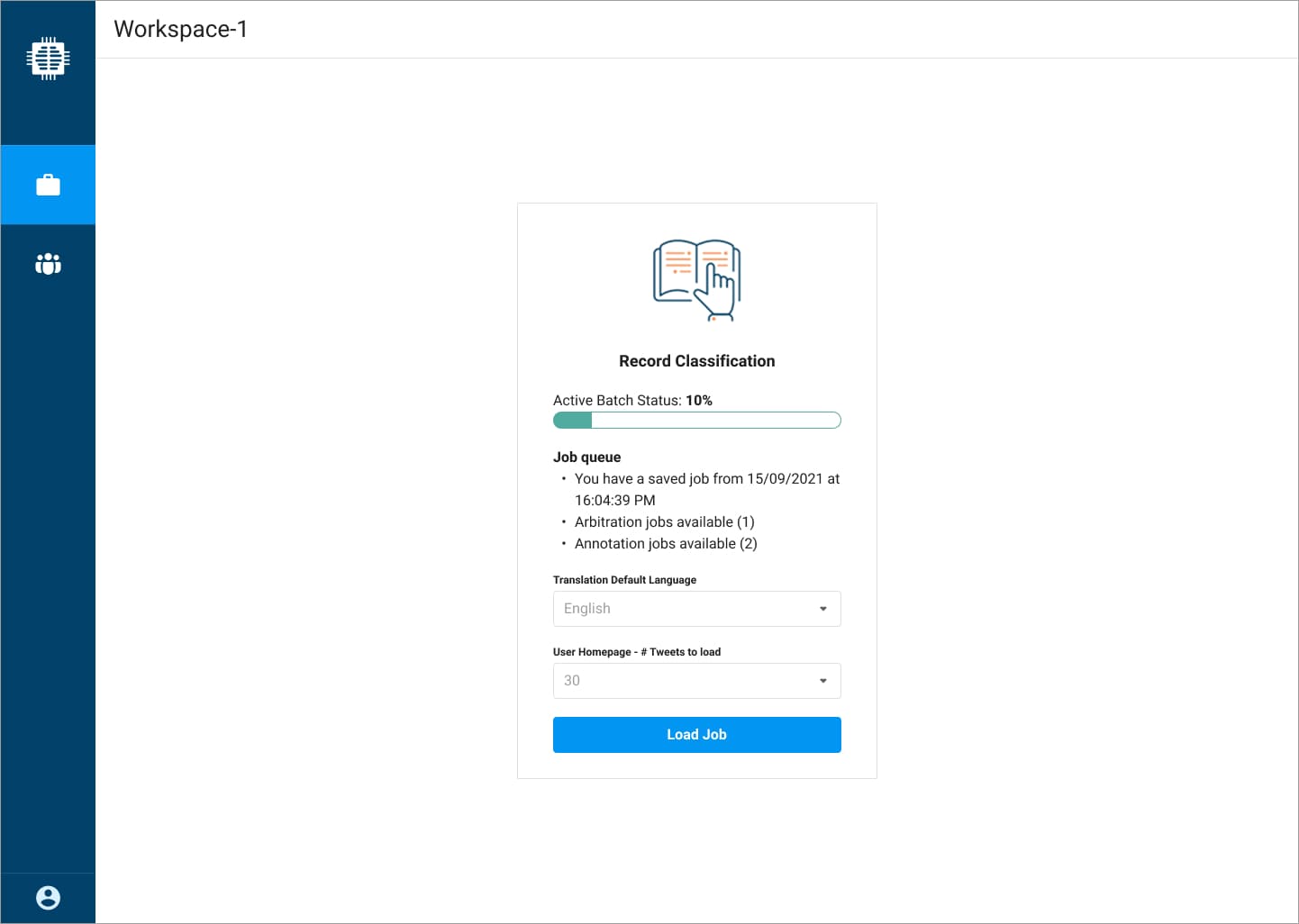
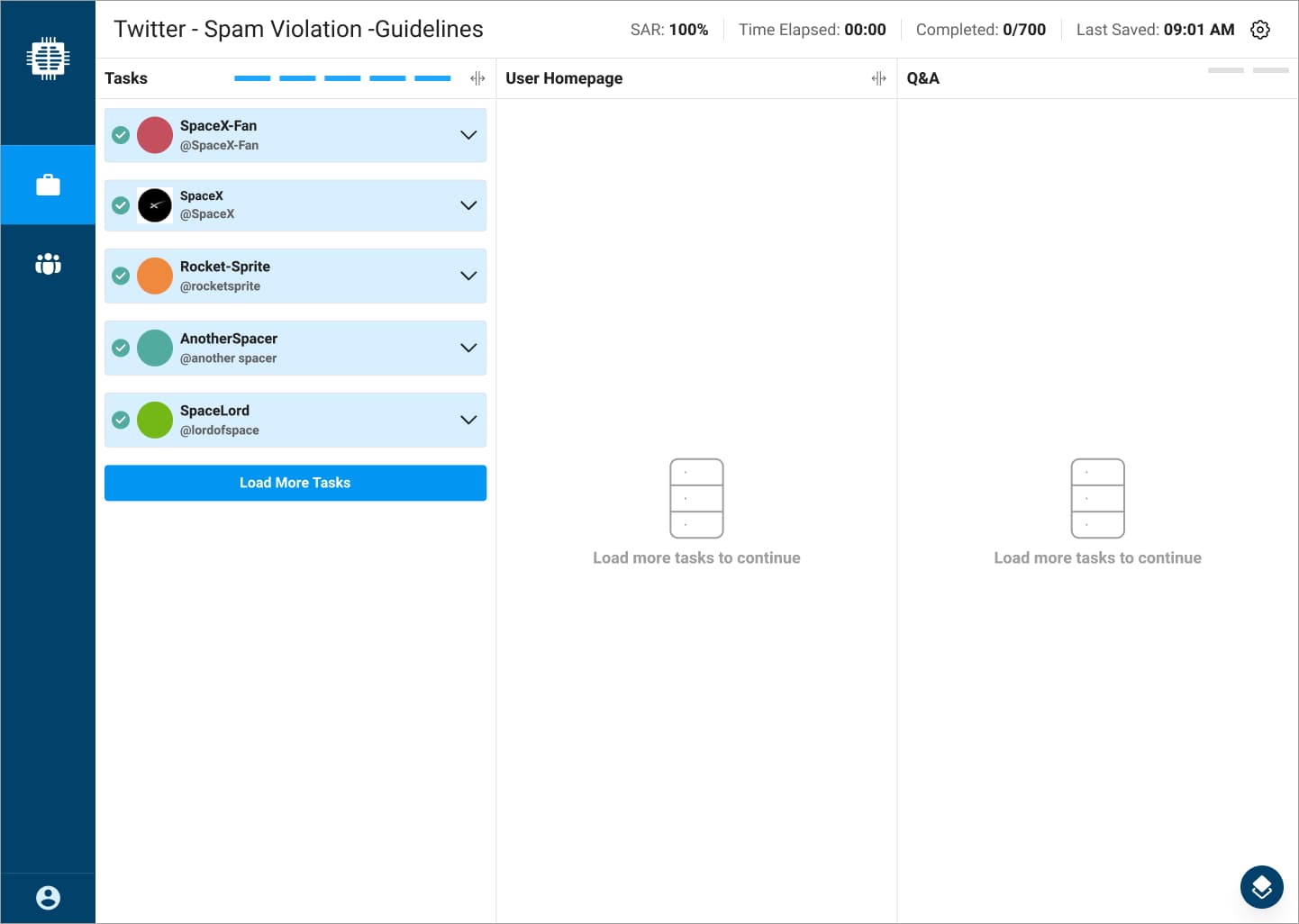
1 — Batch Setup and Job Queue Control
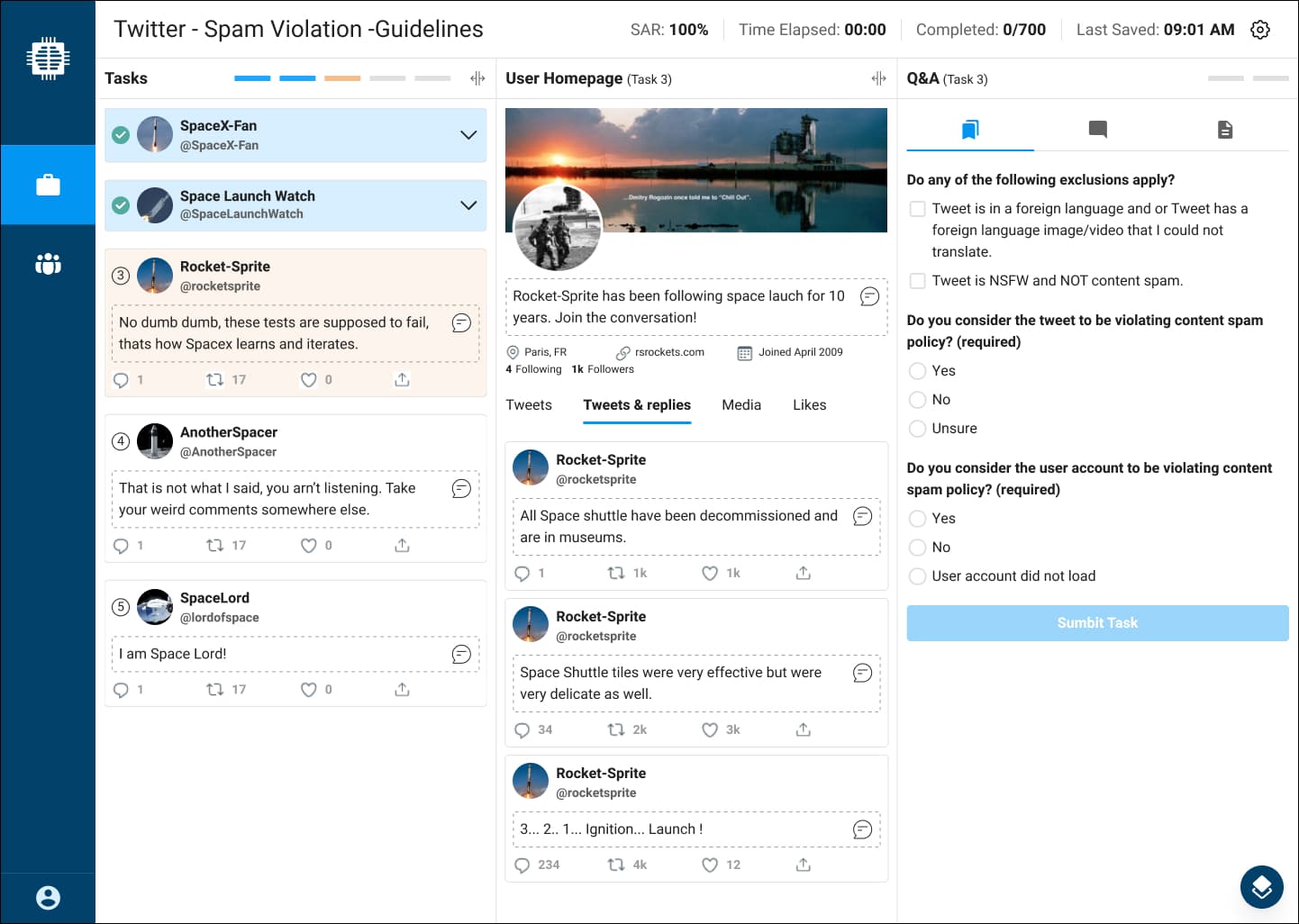
Moderators can see active batch status at a glance and quickly resume saved work or pick from available annotation and arbitration jobs. Session defaults like translation language and tweets-per-load are configured to reduce repeated setup during high-volume work.
2 — Unified Three-Pane Moderation Workspace
A single workspace brings tasks, account context, and the decision form into one consistent layout, reducing tab switching and reorientation between steps. Persistent session telemetry in the header (SAR, completion, save state) keeps performance and progress visible without interrupting flow.
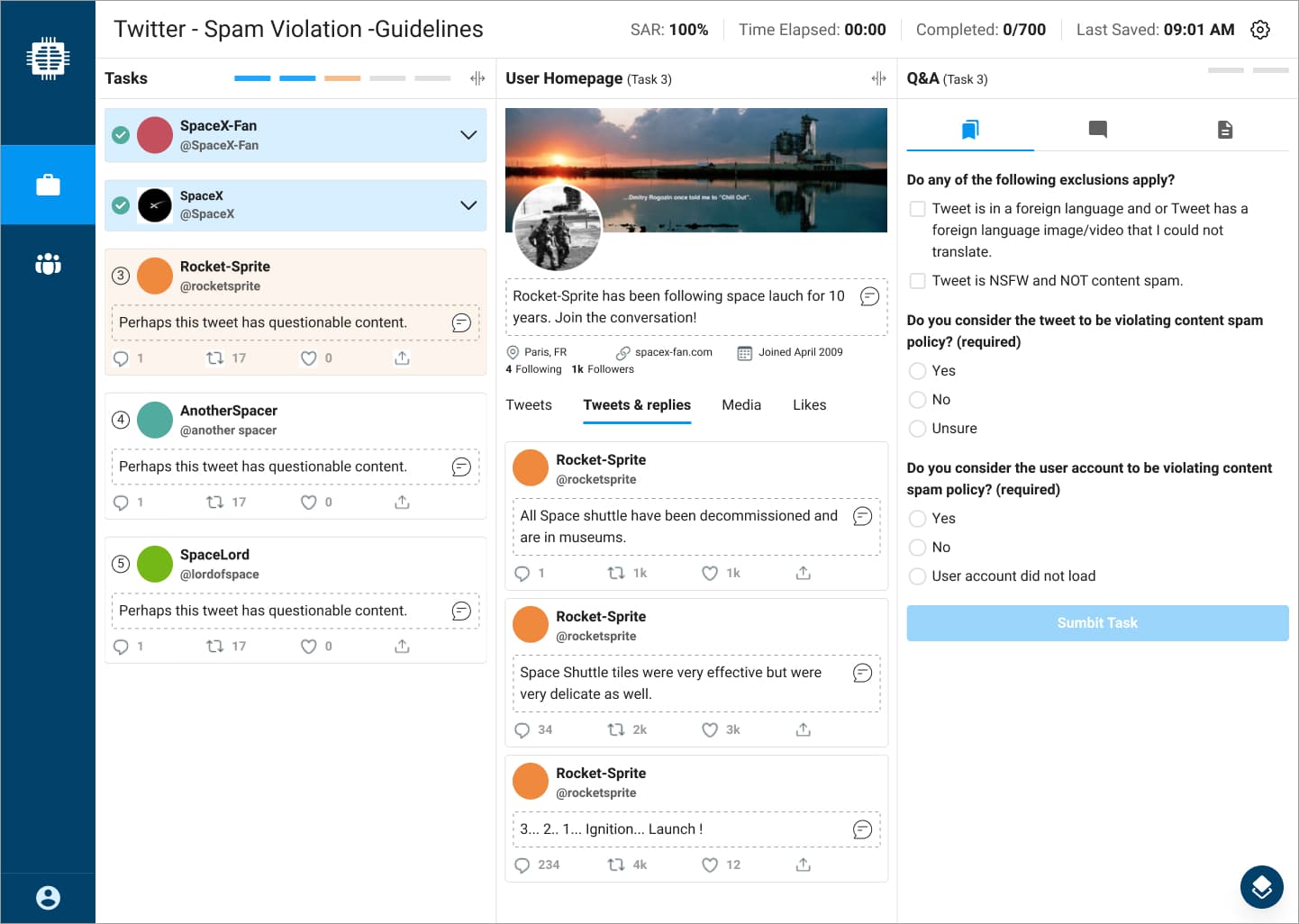
3 — Inline Context and Decision Flow
Moderators can review the user profile and relevant tweet history while completing the classification questions in the same view, supporting faster, more confident decisions. The layout reduces memory load by keeping evidence and the required judgment calls visible at the moment of action.
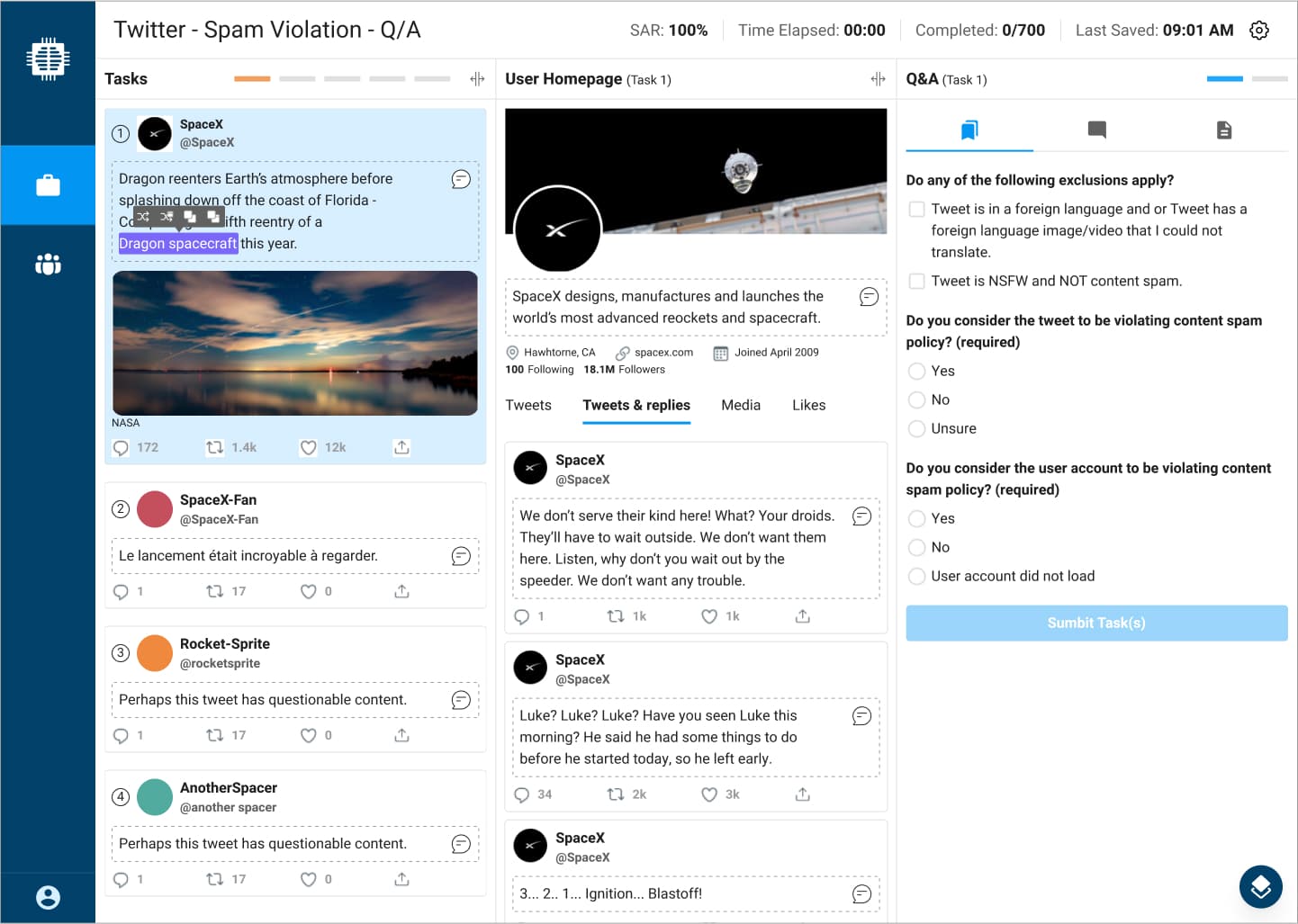
4 — Contextual Copy and Translation Tools
When moderators highlight text, contextual actions surface copy and translation options directly at the point of focus, removing the need to switch tools or leave the workflow. This keeps attention anchored on the content being reviewed while supporting faster handling of multilingual or reference text.
IMPACT
Proven Gains in Speed and Data Quality
After the workbench had been in production for a few weeks, we gathered performance data and feedback from the Twitter team that confirmed our goals and KPIs were being met.
SAR scores increased by 22%
Moderators were able to process more annotation tasks per session, exceeding the initial 10% target.
Managers had more trust in the SAR data
Better data quality helped identify top and bottom performers more accurately.
REFLECTIONS
Key Learnings from the Project
Stakeholder Involvement
Frequent touchpoints with the Twitter team proved essential. Including stakeholders and moderators throughout the process built trust, created shared ownership, and helped validate the final solution once it reached production.
Value of Real User Data
Watching moderators work in real conditions gave us insights we could not have uncovered through interviews alone. The screen-capture videos revealed true workflow patterns and pain points, guiding more accurate and informed design decisions.
Designing for Wellbeing
Moderators regularly encounter harmful content. Although we improved their tools, I wish we could have introduced stronger ways to mask or buffer the imagery they see. Moderator wellbeing remains an important consideration for future content moderation tools.
Next Case Study
SYCLE
Researched and designed a Payers & Plans feature for 5,000+ clinics and 1M+ patients
As Lead Product Designer I led the end-to-end discovery and design for a unified payer administration system that achieved 92% user satisfaction.
Explore the Case StudyWorking on something ambitious?
I'd love to hear what you're building.