AI Clinical Notes
Helping clinicians document visits with AI while keeping control of the final note.
Of active users tried at least one AI Notes capability in the first month.
- Role
- Lead Product Designer, design lead
- Company
- Sycle, audiology practice management
- Collaborators
- Product, Engineering, audiologists and clinic managers
- Scope
- Summarize, Dictate and Full Appointment Recording
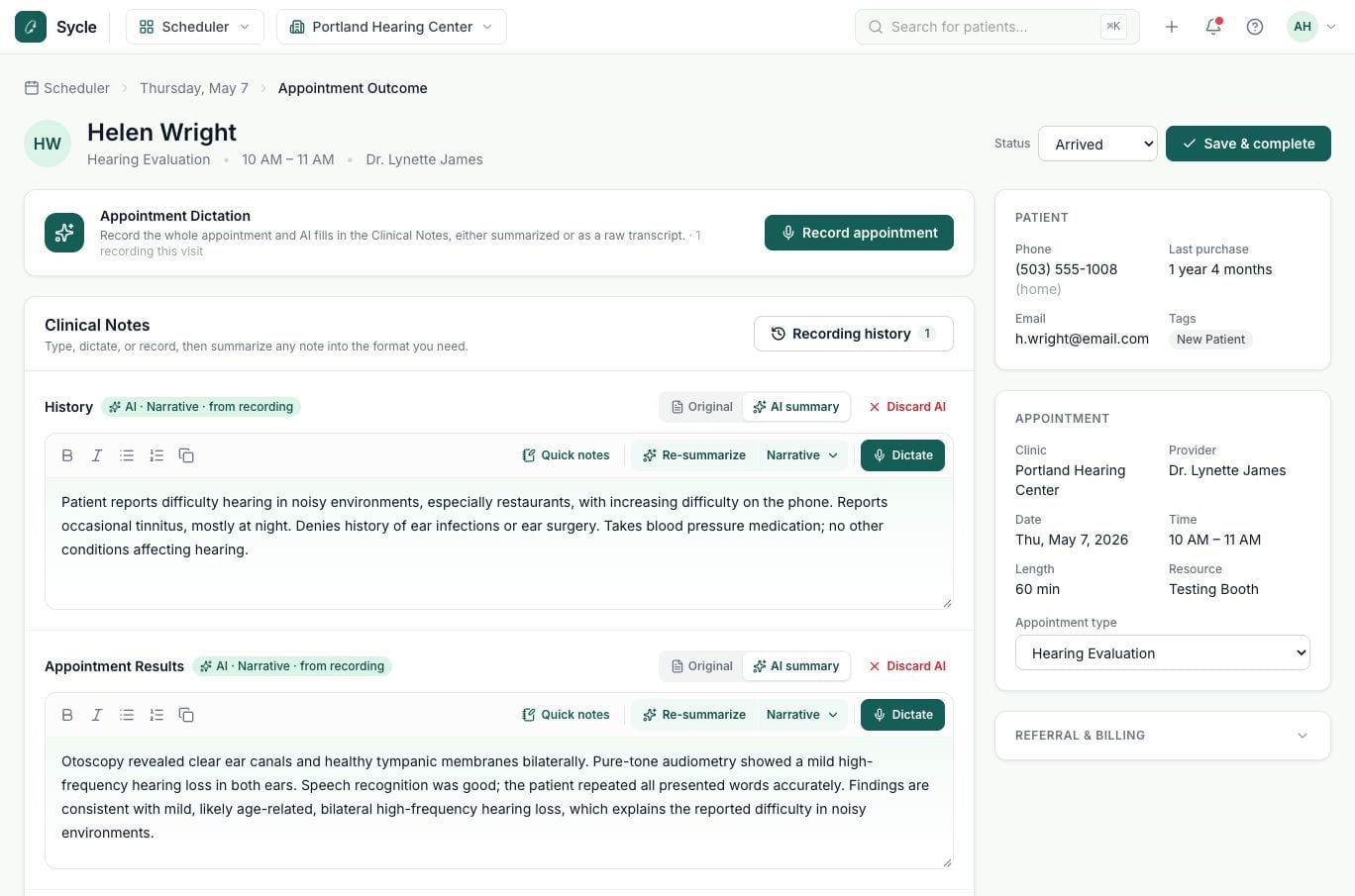
I led the experience design for Sycle’s first AI documentation features
As part of Sycle’s new AI group, I explored how AI could improve clinical documentation and designed a connected experience across Summarize, Dictate, and Full Appointment Recording.
Clinical AI workflows
Experience strategy, workflows, prototypes and refinement.
Three AI Notes features
Summarize, Dictate and Full Appointment Recording.
Sycle provides practice management software to more than 5,000 hearing care clinics. As part of a new AI initiative, I led the experience design for our first clinical documentation capabilities, working with Product, Engineering, and clinicians to introduce AI into established workflows.
Clinical documentation couldn’t keep up with the pace of appointments
Audiologists needed a faster way to document visits without losing clinical details. Sycle wanted to introduce AI capabilities that clinicians would find valuable.
Delayed and inconsistent documentation
Back-to-back appointments pushed documentation to later in the day. Clinicians had to reconstruct visits from memory, while managers struggled with inconsistent note formats.
Drive adoption of AI Clinical Notes
Reduce documentation effort and improve consistency without taking control of the clinical record away from clinicians.
Eight interviews revealed documentation challenges and expectations for AI
Alongside the Product Owner, I interviewed eight audiologists and clinic managers about documentation workflows and AI-assisted notes.
Time and memory
Back-to-back appointments delayed documentation, forcing audiologists to recall details later.
Accuracy and approval
Audiologists welcomed potential time savings but wanted to review and approve AI-generated notes.
Consistent documentation
Managers wanted standardized note formats across audiologists to improve consistency and readability.
Research shaped how we introduced AI into clinical documentation
Introduce AI progressively
Clinics had different levels of comfort with AI, so we introduced features gradually.
Build on familiar workflows
Enterprise adoption concerns reinforced the need to preserve established documentation workflows.
Keep clinicians in charge
Clinicians needed to review and edit AI-generated notes before saving them to the patient record.
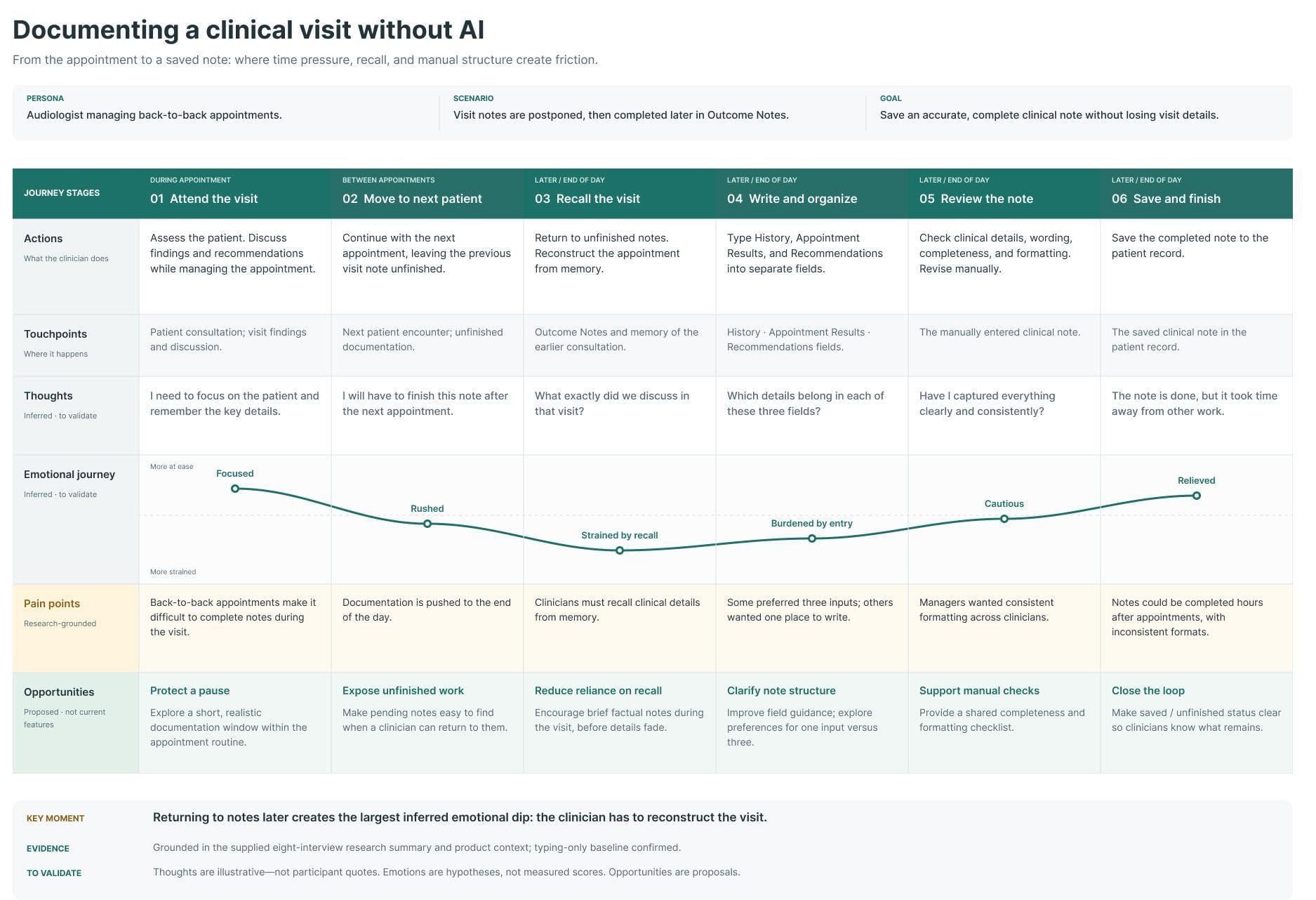
Documentation friction extended beyond the appointment
- 1
Documentation gets postponed
Back-to-back appointments leave little time for notes.
- 2
Clinicians rely on memory
Delayed notes require recalling visit details.
- 3
Organizing notes adds work
Details must be sorted across three note fields.
- 4
Review adds another step
Clinicians verify accuracy before saving.
I advocated a staged rollout to build clinician trust and technical readiness
- 1Phase 1
Summarize
Start with existing notes, allowing clinicians to review AI output while Engineering established the core AI architecture.
- 2Phase 2
Dictate
Introduce live transcription within familiar note fields, adding microphone handling and speech-to-text capabilities.
- 3Phase 3
Full Appointment Recording
Capture entire visits and generate structured notes, introducing longer recordings, transcript processing, and additional safeguards.
I advocated for introducing AI capabilities progressively rather than taking on the complexity of full appointment recording from the outset. Starting with Summarize allowed clinicians to build confidence in AI-generated notes while Engineering established the underlying architecture. Dictate introduced live transcription, followed by Full Appointment Recording with its additional processing, recording, and safety considerations.
This approach balanced the pace of innovation with clinician trust and technical readiness, giving us a foundation to build on with each release.
Four explorations, four decisions about trust and control
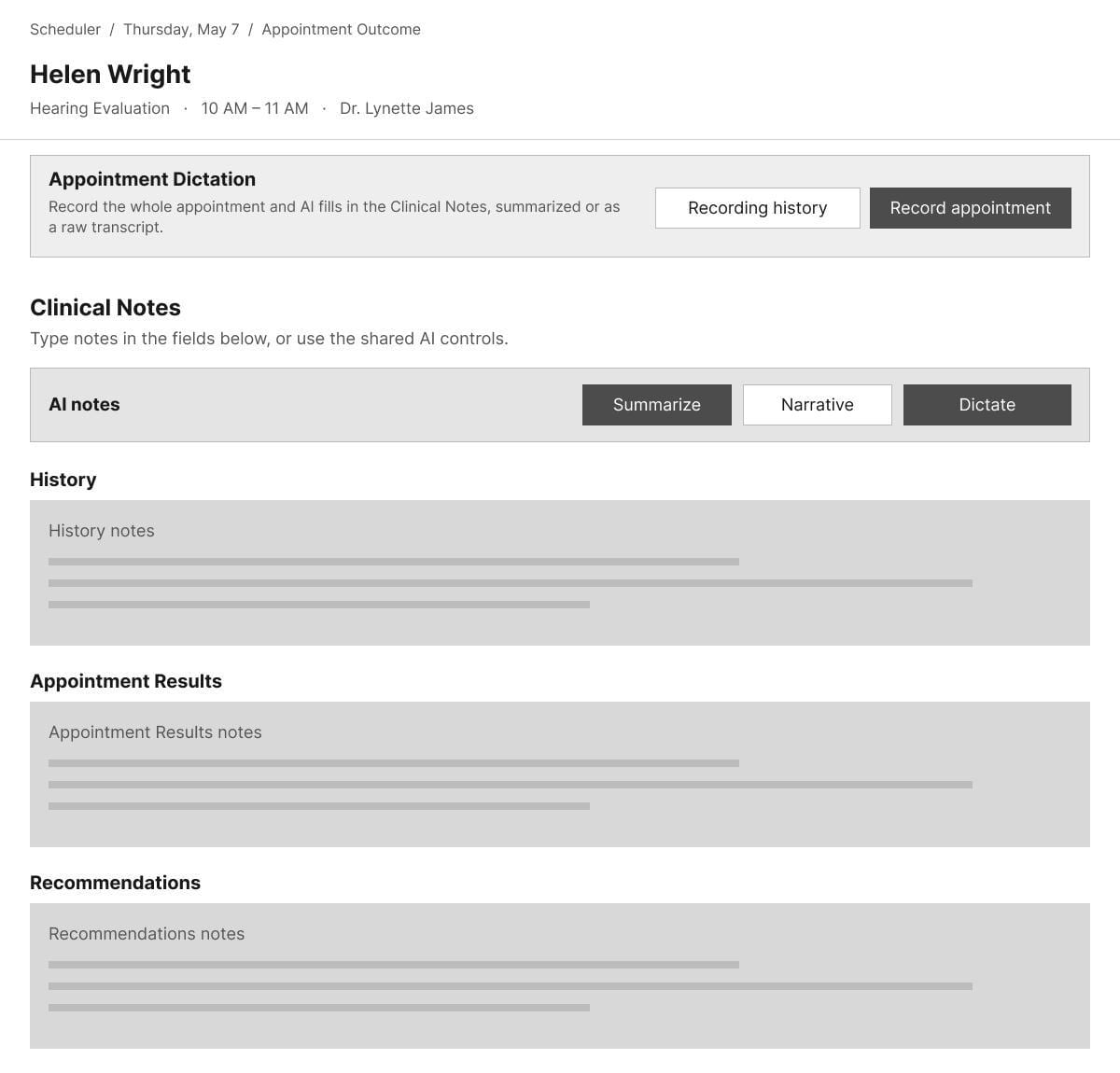
Shared AI controls seemed simpler, but created problems for dictation
- The opportunity
- I explored shared AI controls to simplify the existing three-field interface.
- My exploration
- One Summarize action could process all three fields, but shared Dictate controls made live transcription and field switching unclear.
- The constraint
- Clinicians used the fields independently, sometimes documenting only in Appointment Results.
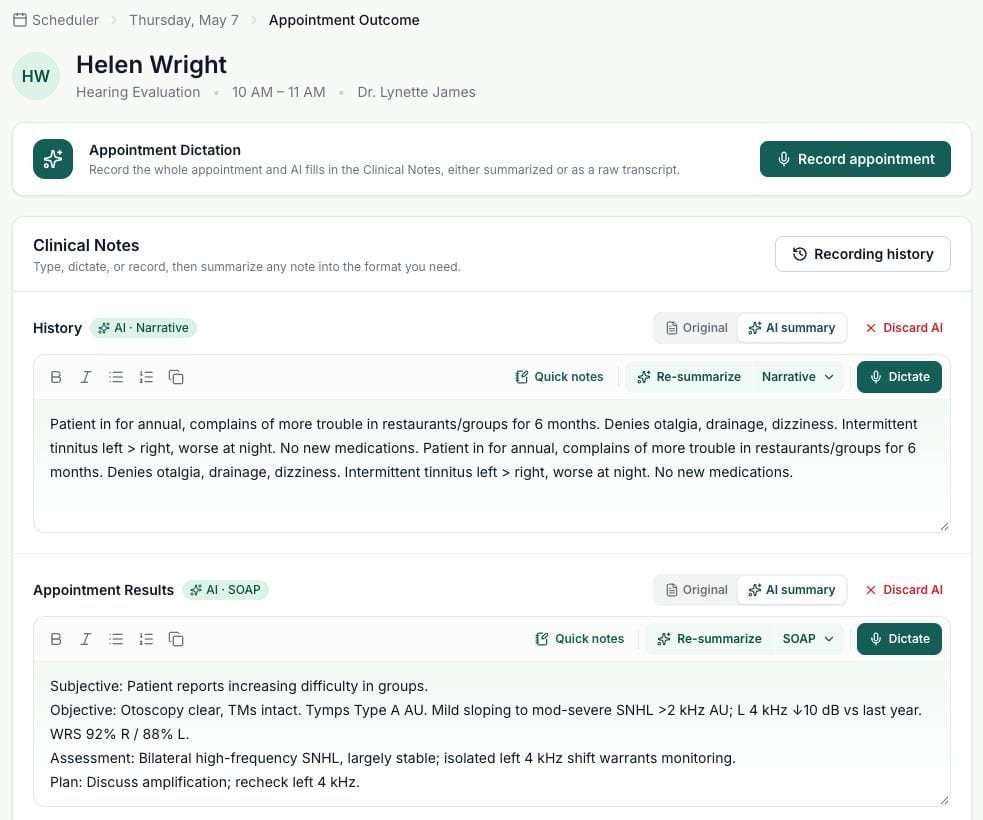
I traded fewer controls for clearer, field-specific AI actions
- The feedback
- Clinicians didn’t always use all three fields. The destination of an AI action needed to be clear.
- My decision
- I placed Dictate and Summarize in each field. Dictation appeared there live, while Summarize processed only that field.
- The trade-off
- Six controls instead of two added repetition but made each action’s behaviour predictable.
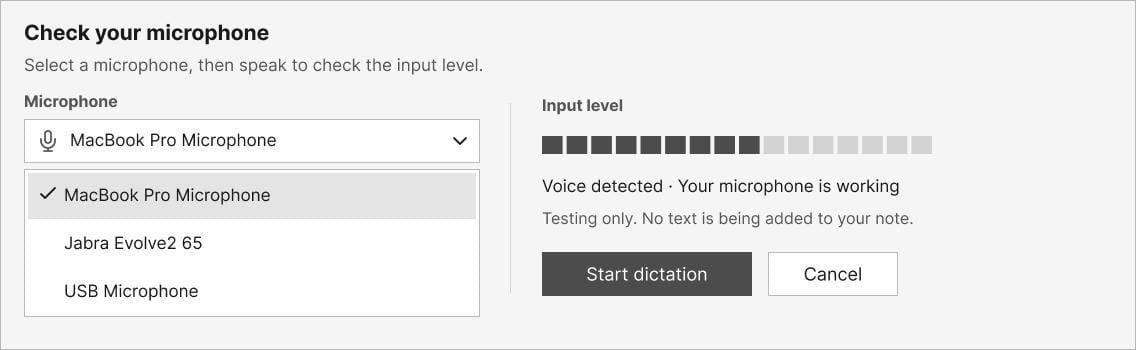
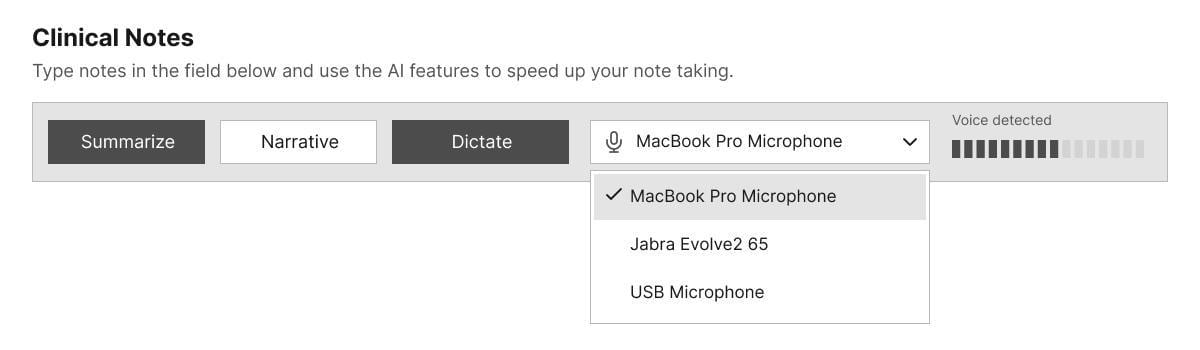
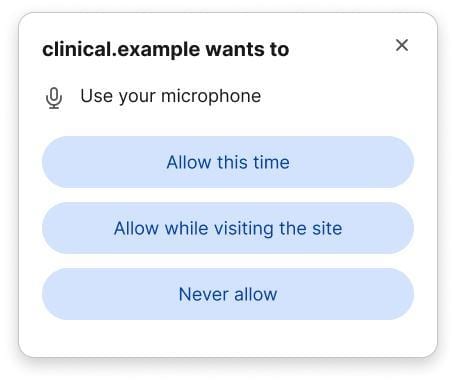
How could clinicians trust that their appointment was actually being recorded?
- The challenge
- Browser permissions and multiple microphones made recording readiness unclear.
- The risk
- Clinicians could finish an appointment without capturing usable audio.
- The exploration
- I explored microphone selection, permission states, and live audio feedback to confirm recording readiness.
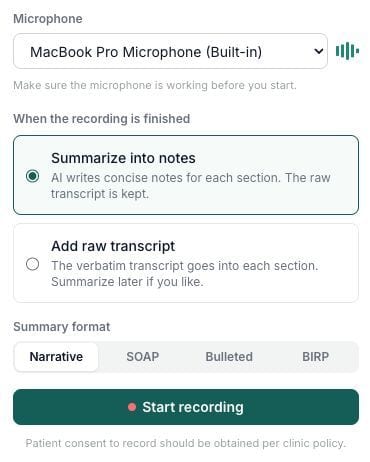
I made microphone readiness visible before clinicians started recording
- My decision
- Require microphone selection and live audio feedback before recording.
- The trade-off
- Switching microphones required restarting, making the initial device check essential.
- The outcome
- Clinicians could confirm their microphone was capturing audio before starting.
Scheduled appointment length wasn’t a reliable recording limit
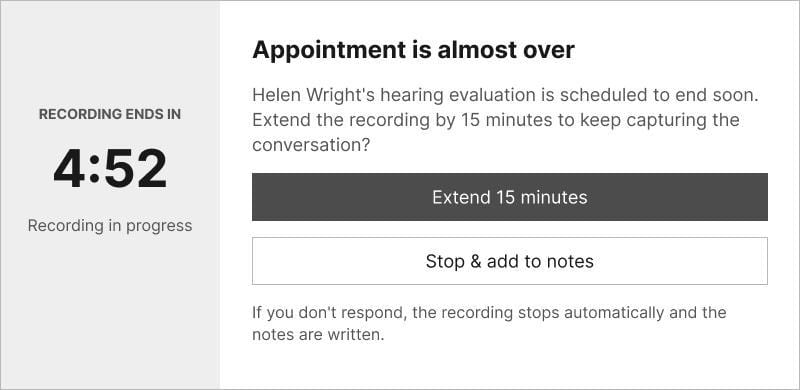
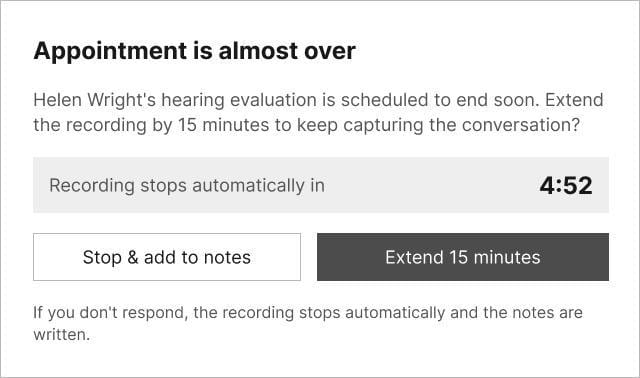
- The initial approach
- I used the scheduled appointment length to set the recording limit.
- The constraint
- Longer visits risked losing audio, while unattended recordings increased processing and storage costs.
- The exploration
- I explored manual durations, automatic stopping, and warnings that allowed clinicians to extend recording.
I designed a recording extension that balanced flexibility with cost
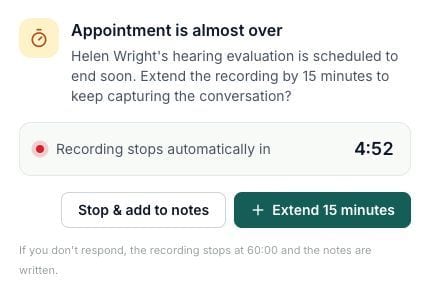
- My decision
- I added a warning with options to stop and generate notes or extend recording by 15 minutes.
- The trade-off
- Allow repeated extensions, but automatically stop recordings when warnings go unanswered.
- The outcome
- The shipped design accommodated longer appointments while limiting unattended recordings.
Discarding AI notes wasn’t enough to protect the originals
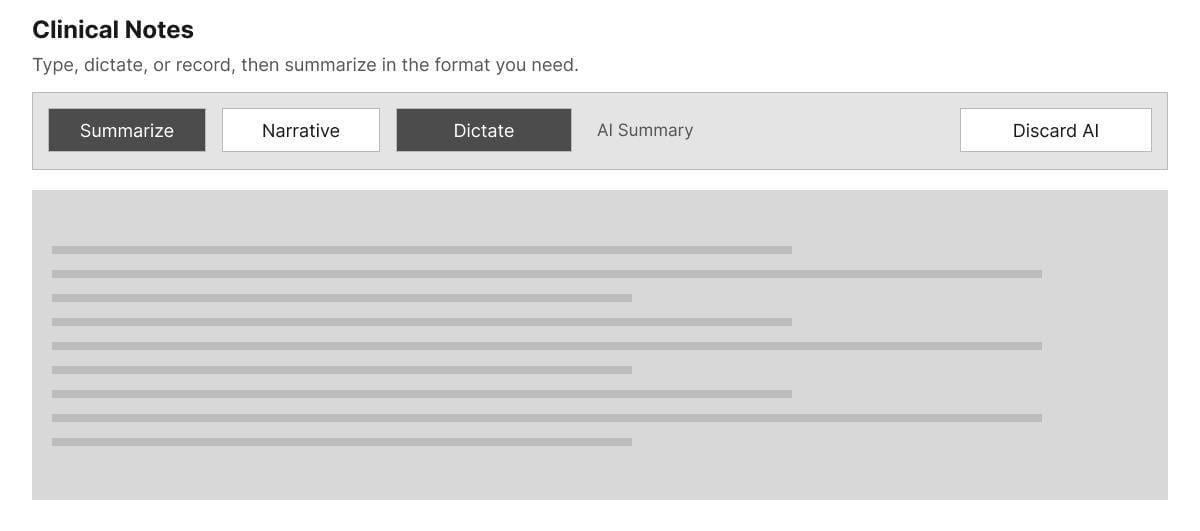
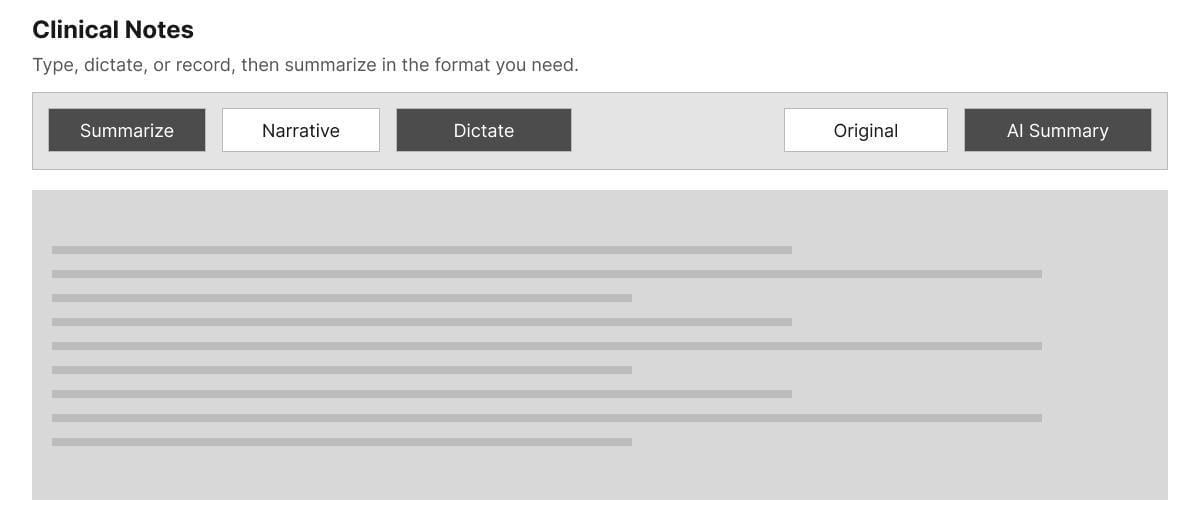
- The research
- Clinicians wanted to compare AI notes, preserve originals, and restore them if AI made mistakes.
- The initial approach
- I explored a Discard AI action to restore original notes when clinicians rejected a summary.
- The iteration
- Discard allowed recovery, but not comparison. I explored switching between Original and AI Summary.
I gave clinicians a way to compare, edit, and restore AI-generated notes
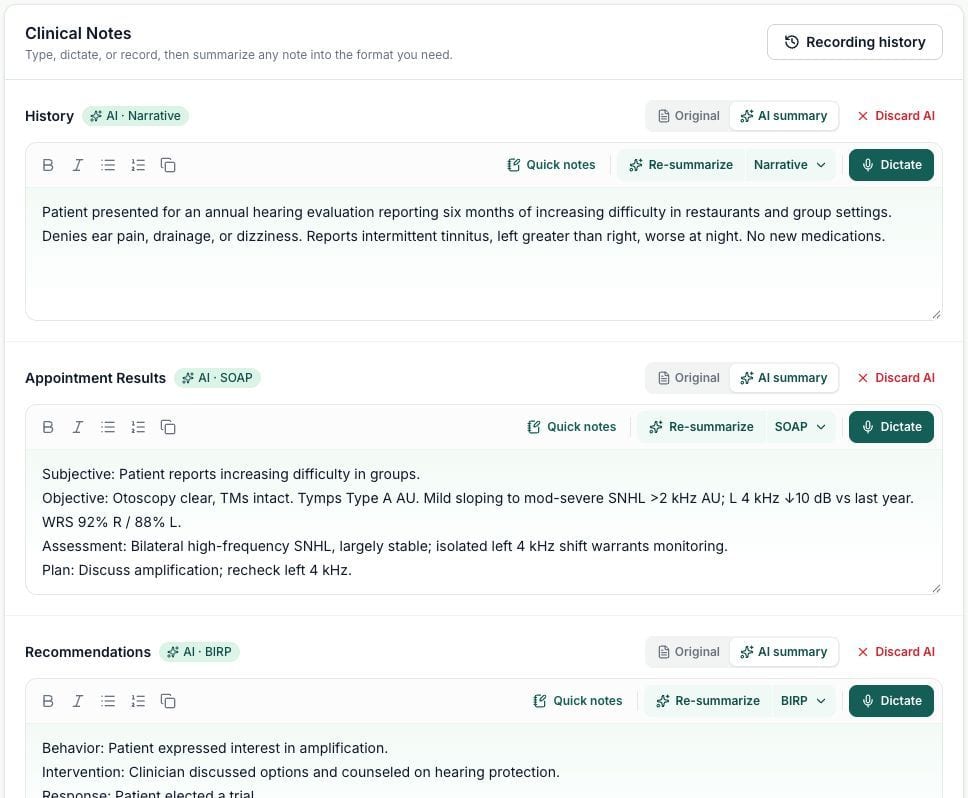
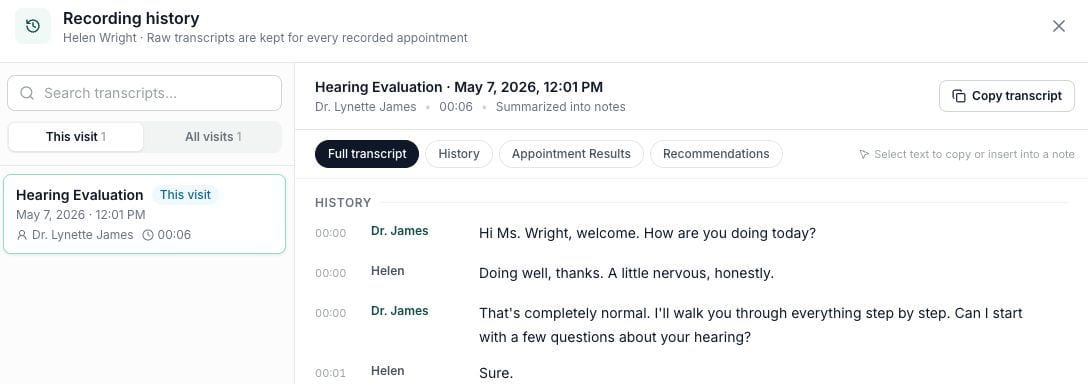
- My decision
- I introduced Original and AI Summary views so clinicians could compare and edit notes before saving.
- The safeguard
- Discard AI restored original notes, while full appointment transcripts remained available in recording history.
- The outcome
- Clinicians could review AI changes and control what entered the patient record.
AI that fits inside familiar clinical workflows
Capture and summarize notes within familiar clinical fields
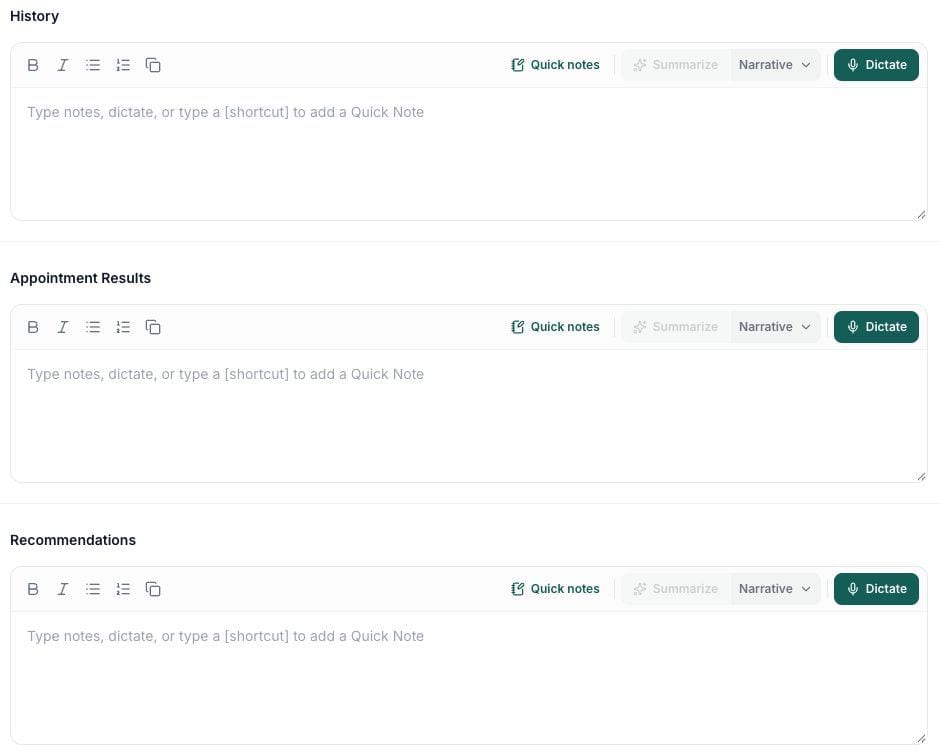
- Dictate
- Type or dictate into History, Appointment Results, or Recommendations.
- Summarize
- Generate an AI summary of the selected field using the chosen format.
- Control
- Use AI independently in each field without changing the existing workflow.
Record the full appointment with clear status and controls
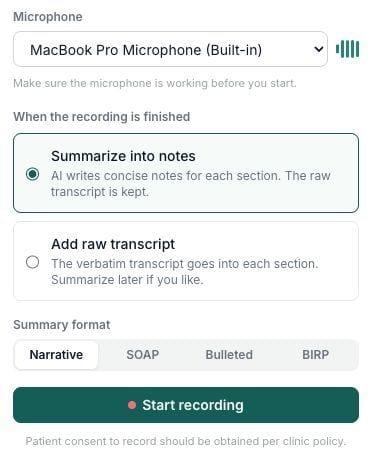

- Prepare
- Select a microphone and verify that it is receiving audio before beginning the appointment.
- Record
- Monitor recording status, elapsed time, audio levels, and spoken content throughout the visit.
- Finish
- Stop and generate clinical notes, or extend recording by 15 minutes when the appointment runs long.
Review, revise, and recover AI-generated clinical notes
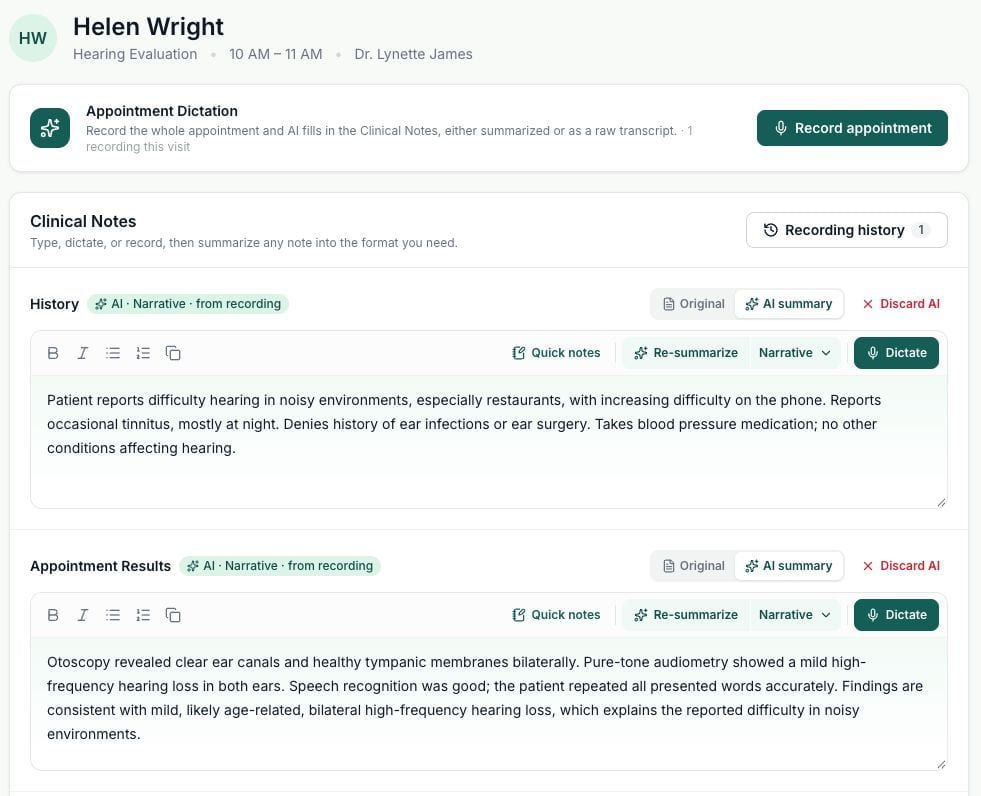
- Review
- Switch between Original and AI Summary to inspect generated content and make corrections.
- Reject
- Discard the AI summary and restore the original documentation when necessary.
- Recover
- Access the appointment recording history and copy transcript text for reference or recovery.
Early adoption and clinician feedback showed promising results
Of active users tried an AI Clinical Notes feature at least once, tracked through Heap.
Audiologists reported that appointment recording helped them focus on patients instead of taking notes.
Managers valued more consistent AI-generated notes.
Clinical AI needed to assist without replacing judgment.
Familiar workflows made room for AI
Building on existing workflows helped clinicians adapt as AI capabilities evolved.
Make AI corrections more informative
I’d study recurring AI corrections to identify gaps and improve output quality.
Measure sustained value
Track repeat use, correction frequency, and time to completed documentation.